


-
What people mean by “the business version of ChatGPT”
When people say “the business version of ChatGPT,” they usually mean ChatGPT Enterprise—OpenAI’s enterprise-grade offering with advanced security, admin controls, higher caps, and deployment options designed for organizations. For smaller teams, OpenAI also offers ChatGPT Team, which brings shared workspaces and business-grade privacy without the full suite of enterprise controls.
- ChatGPT Enterprise: enterprise security and compliance, higher performance limits, admin console, SSO/SCIM, analytics, and governance features. OpenAI Enterprise
- ChatGPT Team: a more lightweight plan for small-to-medium teams that still keeps conversations private from model training and supports shared knowledge and custom GPTs. Introducing ChatGPT Team
You’ll also hear related terms:
- The OpenAI API (for developers) lets you embed models like GPT‑4o into your apps with full programmatic control. OpenAI Platform Docs
- Third‑party “business AIs” (e.g., Microsoft Copilot, Google Gemini for Workspace, Anthropic Claude Team) integrate deeply with office suites or emphasize different strengths. More on these below.

-
Why organizations pick ChatGPT Enterprise
ChatGPT Enterprise builds on the familiar ChatGPT experience but adds the infrastructure and assurances IT leaders expect.
- Privacy and data handling: Enterprise and Team chats are not used to train OpenAI models, and data is encrypted in transit and at rest, according to OpenAI’s enterprise materials. OpenAI Enterprise
- Security and compliance: OpenAI has stated SOC 2 compliance for ChatGPT Enterprise and provides auditability features. ChatGPT Enterprise announcement
- Admin and governance: Centralized admin console, domain verification, SSO/SCIM provisioning, usage analytics, and workspace controls.
- Performance and features: Priority access to the latest models (e.g., GPT‑4o), higher rate limits, longer context, and advanced tools (code execution, file analysis, and retrieval features). Feature availability evolves quickly—check OpenAI’s site for the latest.
- Knowledge and custom GPTs: Curate company knowledge bases and build domain‑specific GPTs for your teams, with controls over who can access and share them. GPTs overview
Bottom line: Enterprise is designed to scale across departments, meet security review, and give leaders the levers to manage usage responsibly.
-
ChatGPT Team vs. Enterprise at a glance
ChatGPT for work—quick comparison
Plan Best for Data use for training Admin & SSO Performance & tools Pricing ChatGPT Team Small teams and startups Not used for training (per OpenAI) Basic workspace controls; no full enterprise suite Access to advanced models, shared workspace, custom GPTs Public list pricing (often per user/month) ChatGPT Enterprise Mid‑market and enterprises Not used for training (per OpenAI) Admin console, SSO/SCIM, analytics, governance Higher rate limits, priority access, advanced features Custom/volume pricing Notes:
- OpenAI’s pricing and features can change; confirm current details on the official pages before procurement. OpenAI Enterprise • ChatGPT Team
- Both plans are distinct from the consumer “Plus” tier and from API usage.
-
How it compares to Copilot, Gemini, and Claude
The “best” business AI often depends on your stack.
- Microsoft Copilot for Microsoft 365: Deeply integrated with Outlook, Teams, Word, Excel, and SharePoint. Strong choice if you live in Microsoft 365 and want on‑by‑default document, meeting, and email context. Microsoft Copilot for Microsoft 365
- Google Gemini for Workspace: Tight integration with Gmail, Docs, Sheets, and Meet. Strong option if you’re standardized on Google Workspace. Gemini for Workspace
- Anthropic Claude (Team/Business): Known for helpfulness/harmlessness balance and long context windows; popular for reasoning, writing, and analysis. Claude for teams
- AWS Q: Tailored to AWS customers who want an assistant for cloud operations, documentation, and enterprise knowledge. AWS Q
If email, docs, and meetings are the main context your users need, a suite‑native assistant can be compelling. If you need a neutral, suite‑agnostic chat assistant with strong governance, or you want to build domain‑specific GPTs, ChatGPT Enterprise is a strong fit.
-
Common business use cases (with quick wins)
- Sales and marketing: Draft outreach by segment, turn calls into action items, analyze competitor pages, and refine messaging for different personas. Pair with a curated knowledge base for on‑brand responses.
- Customer support: Triage tickets, propose replies grounded in your help center, and auto‑summarize case history. Use retrieval from your docs to reduce hallucinations.
- Engineering and data: Explain logs, write unit tests, generate SQL, refactor code, and produce documentation. Use advanced data analysis for exploratory analytics and CSV wrangling.
- Operations and HR: Draft SOPs and job descriptions, summarize policy changes, create onboarding checklists, and standardize communications.
- Finance and legal: First‑pass contract summaries, variance explanations, and scenario write‑ups. Always pair with human review and clear guardrails.
-
Deployment paths: standalone, API, or hybrid
You can adopt ChatGPT Enterprise in a few ways:
- Standalone chat: Provision ChatGPT Enterprise or Team accounts. Fastest path to value; great for knowledge work, content, and analysis.
- API‑powered apps: Use the OpenAI API to integrate GPT‑4o into internal tools, chatbots, or workflows. You control prompts, context, telemetry, and guardrails. OpenAI Platform Docs
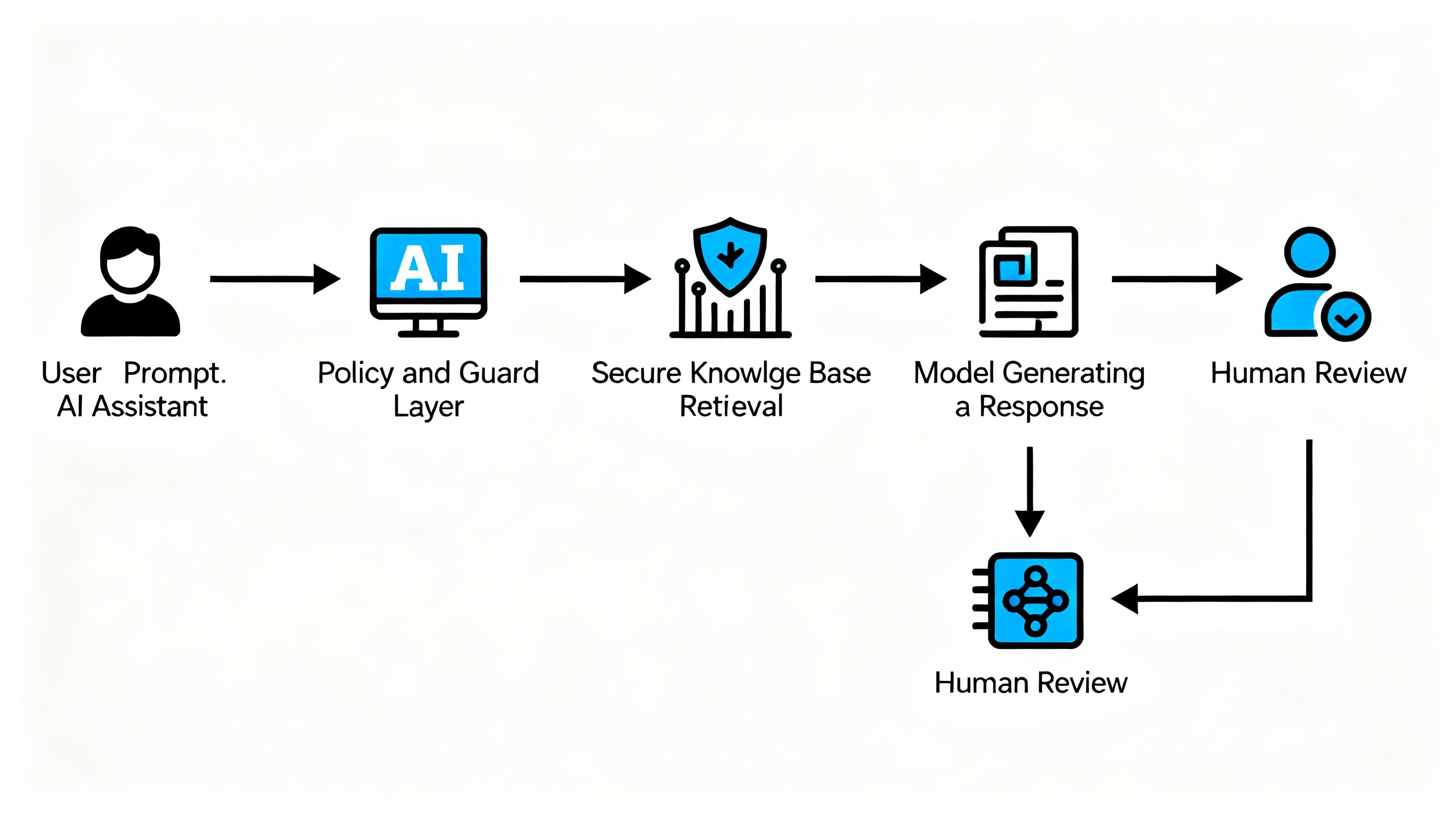
- Hybrid with retrieval (RAG): Point the model at your private data via secure retrieval so answers are grounded in your policies, products, and playbooks. Combine with vector databases and access controls for relevance and safety.
Architecture tips:
- Log prompts/outputs in a secure data store for QA and red‑team review.
- Segment knowledge by department and permission group; don’t dump everything into one index.
- Establish DLP rules (e.g., PII/PHI redaction) before rollout.
-
How to choose: a quick decision guide
- If you’re <50 users and need fast collaboration with business‑grade privacy, start with ChatGPT Team.
- If you require SSO/SCIM, audit logs, and tight governance—or plan a broad rollout—choose ChatGPT Enterprise.
- If you live in Microsoft 365 or Google Workspace and want assistants inside your docs/meetings by default, evaluate Copilot or Gemini alongside ChatGPT.
- If you emphasize long‑context reasoning and writing, add Claude to your bake‑off.
-
Implementation playbook: your first 90 days
- Week 0–2: Foundations
- Confirm data handling and compliance needs; involve Security and Legal early.
- Decide on Team vs Enterprise; define pilot scope, success criteria, and red lines (what the model must never do).
- Week 2–4: Pilot build
- Create 1–2 custom GPTs or API prototypes with curated knowledge sources.
- Draft style guides (tone, formatting) and prompt templates for repeatable results.
- Week 4–8: Rollout to a cohort
- Train champions; set up SSO/SCIM and workspace permissions.
- Instrument logging and feedback; run red‑team tests on sensitive prompts.
- Week 8–12: Measure and expand
- Track time saved, quality score (editorial review), and deflection rate for support.
- Publish internal playbooks and prompt libraries; expand thoughtfully to the next team.
- Week 0–2: Foundations
-
FAQs (quick, practical answers)
- Is my company data used to train OpenAI models? For ChatGPT Enterprise and Team, OpenAI states chats are not used for training. Verify in the latest docs and your contract. OpenAI Enterprise
- Does it support SSO and provisioning? Enterprise supports SSO and SCIM; Team has lighter admin controls. Check the admin docs during procurement.
- Can we ground responses in our content? Yes—via enterprise knowledge features or API retrieval (RAG). Keep sources versioned and access‑controlled.
- Pricing? Team typically lists per‑user pricing; Enterprise is custom. Confirm current pricing on official pages.
- Alternatives? Microsoft Copilot (M365), Google Gemini (Workspace), Anthropic Claude Team/Business, and AWS Q—each with different strengths.
-
The bottom line
The “business version of ChatGPT” is ChatGPT Enterprise—with ChatGPT Team as a lighter option for smaller groups. If you want a suite‑agnostic assistant with enterprise controls, it’s a strong candidate. If your priority is deep integration with Microsoft or Google apps, compare Copilot and Gemini. Whichever route you choose, start with well‑scoped use cases, add retrieval for accuracy, require human review for high‑risk outputs, and track outcomes—not just usage. That’s how AI stops being a demo and starts returning value.